The Preview, Beside Your Writing
FoldNotes keeps your Markdown in plain sight while you write. Now the finished page can sit right beside it.
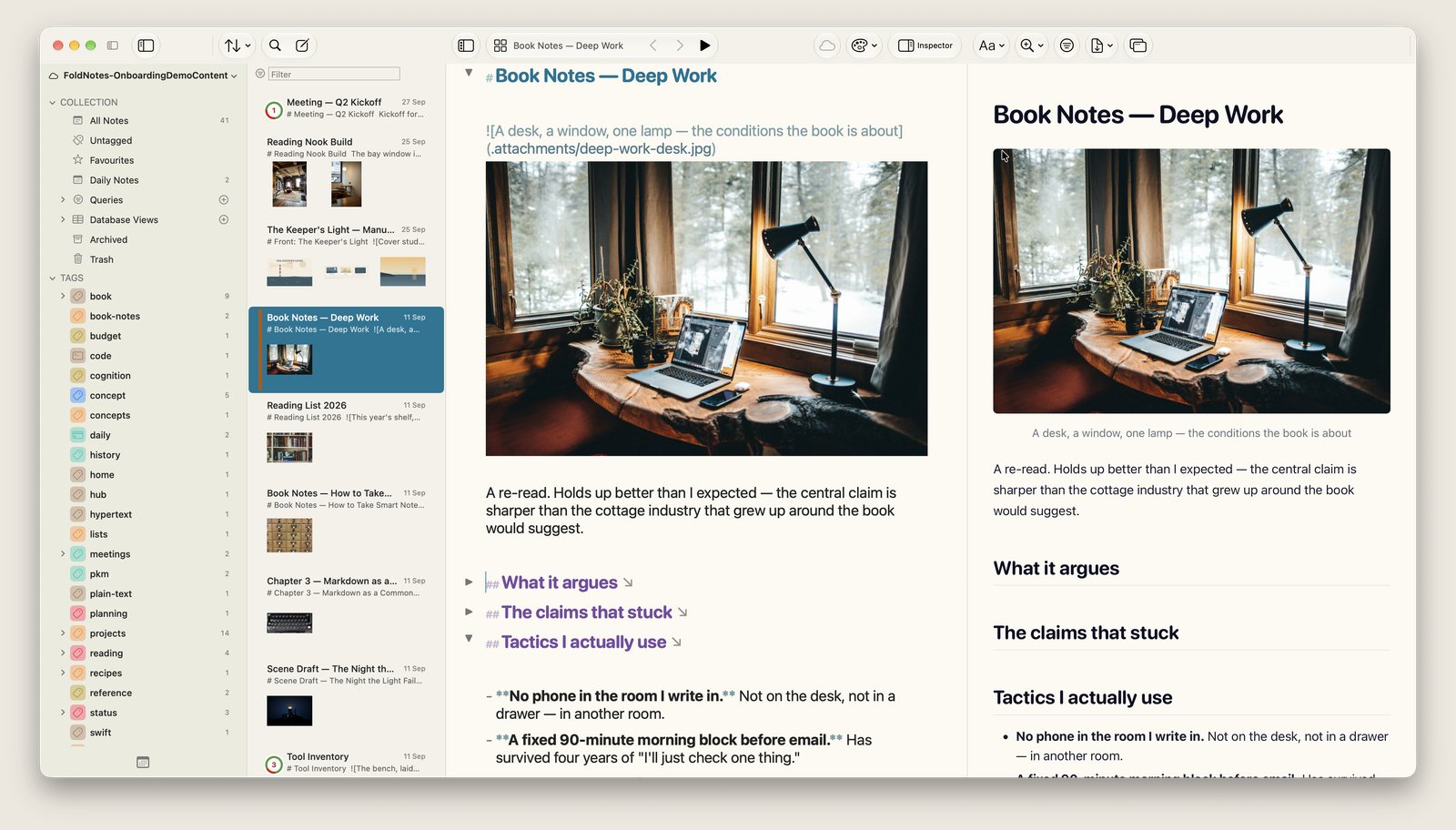
Choose View › Preview Beside Editor (Option-Shift-Command-P), and the Preview opens next to your note, in the same window.
- It scrolls with you, either way, so the part you’re working on stays in view, and it keeps the line you’re typing on screen.
- It shows what the editor shows. Fold a section and it folds on the page; hoist one and the page follows.
- It’s a page you can work in. Tick tasks, follow links to other notes, and give it its own theme and zoom.
- Share from it. Export to PDF, Word, HTML and more from the toolbar above it, or detach it into its own window.
- Drag the divider to share the window your way. FoldNotes remembers the split.
On iPad, tap the book for the same Preview beside your note.
Never miss an update
Mac apps tend to stay open for days, and FoldNotes used to look for updates only when it started. Now it also looks once a day while it’s open. When a new version is ready, a small Update button appears at the bottom of the sidebar. Click it to see what’s new and install it.
If you haven’t seen the Preview beside the editor yet, choose FoldNotes › Check for Updates to get the latest version.
Every note is still a plain Markdown file in your own folder.
Download FoldNotes for Mac and try every feature free for 7 days.